FAQs
Accounts and Subscriptions
Blank and hidden
I have purchased a monthly subscription, but I cannot see most of The Library videos 🙁
The unlimited access to the hundreds of videos in The Library is available to the Annual subscribers. As a Monthly subscriber, you have access to a select number of videos, and to all Ongoing Programmes.
How do I upgrade my subscription from Monthly to Annual?
You can do the upgrade/downgrade yourself, but first your existing order has to be cancelled.
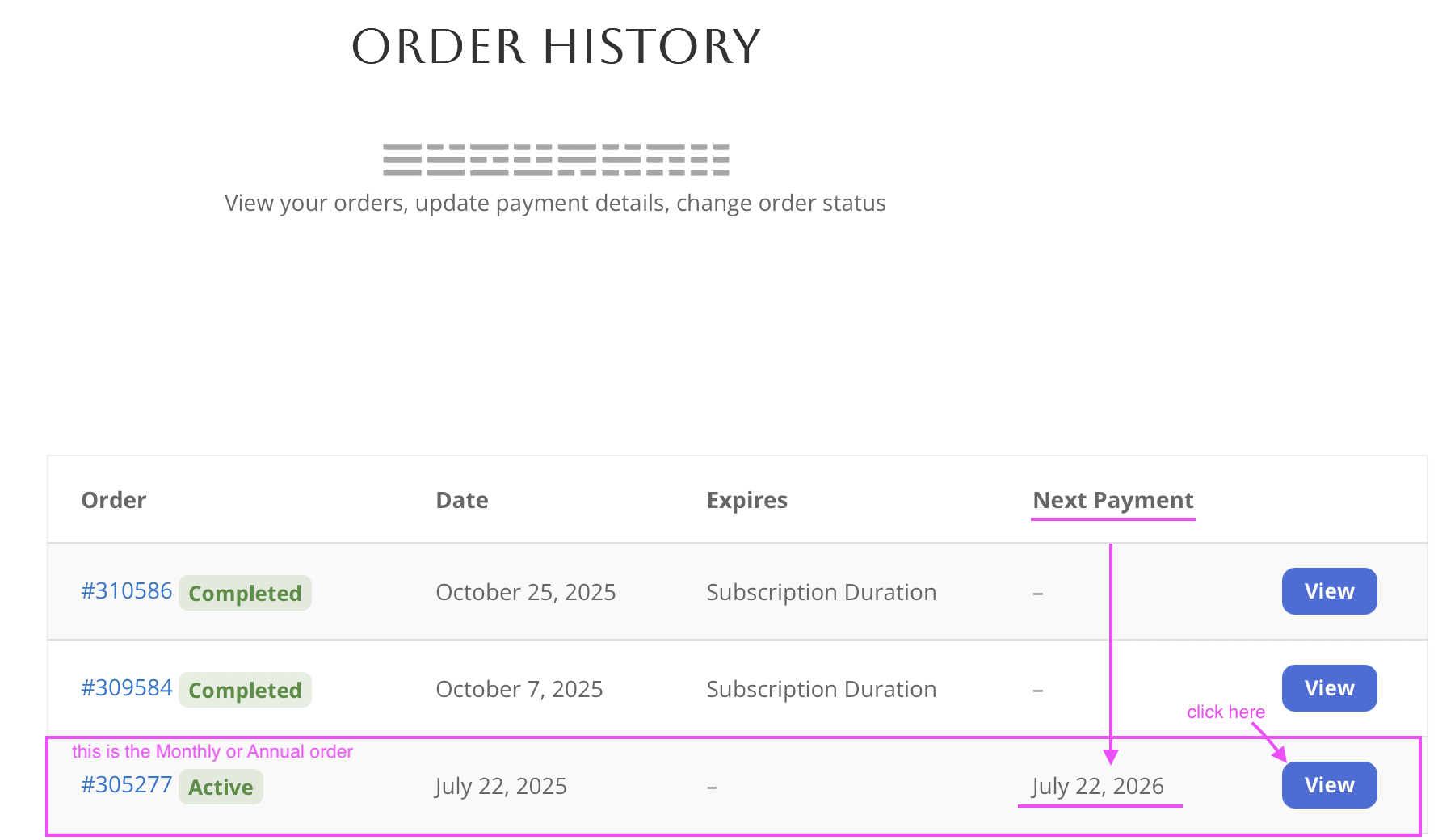
Log into the Members area, hover over ‘MEMBERS‘ at the top right corner, and click on Order History.
On the Order History page, find on the list your IAA Monthly or IAA Annual order. It’ll be the order where there is a date written under the “Next Payment” column, usually at the bottom of the list, see image below

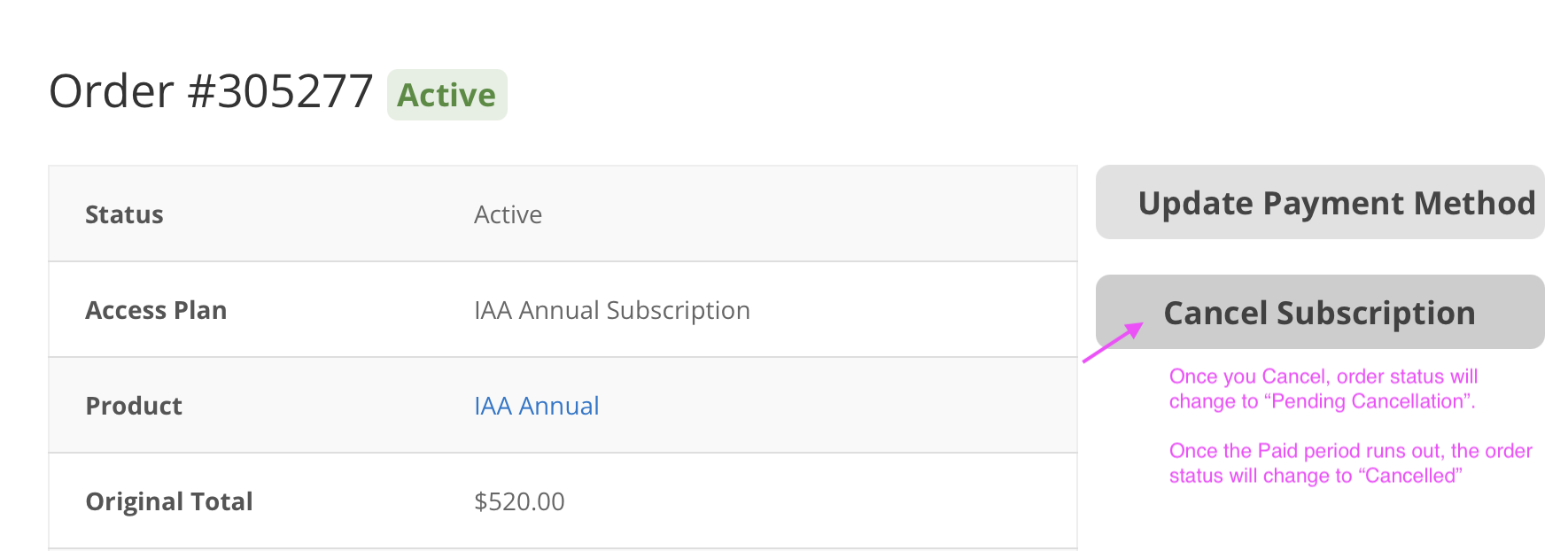
Click the Monthly/Annual Order, and cancel it there; Then, the status of the order will switch to “Pending Cancellation” (you’ll also recieve an email notification). Once the paid period runs out, the status will switch to “Cancelled” (you’ll also recieve an email notification).
To Upgrade/downgrade your current subscription, first follow the cancellation instructions above, wait until your current paid period runs out. You must first wait for it to be cancelled (it’ll change status, and you’ll get an email notification). Now, log in to your existing account, and go to “Subscribe” to purchase a new subscription. You’ll be able to continue where you left off.
Once I upgrade my account from Monthly subscription to Annual, will my Ongoing Program progress be lost?
Your course progress will not be lost as long as you are logged in when you upgrade/rejoin – the course progress is associated with your login.
How do I cancel/pause my subscription?
You can cancel your subscription by hovering over ‘Members‘ at the top menu bar, and clicking Order History. Then, find your annual or monthly order, and manage it there.
(It’ll be the one with a date written under the Next Payment column, usually at the bottom of the list).
Pausing is essentially cancelling. Once you are ready to rejoin, make sure to log in to your account first, then purchase a new subscription. You’ll be able to continue where you left off.
Once you have cancelled your subscription your status will change to “pending cancellation”, this means that you will still have access until the expiration date of your subscription. After it has expired your subscription will be fully cancelled and you won’t be charged again.
Will my subscription auto-renew, or do I need to manually renew it?
Your subscription will auto-renew, unless you cancel it (by going to ‘My Orders’), or the payment fails to go through.
I need to pause/cancel my membership. Will I still be able to access the content? Will my progress be saved?
What you pay for is the access to the members area, Discord community and access to all the courses, therefore once you pause/cancel your subscription you will not have access anymore.
However, once you re-subscribe again, all the lessons you have unlocked will be available. Just make sure to log in to your account prior to purchasing new subscription. (You can still log in after cancelling, but can’t access the student dashboard or any courses)
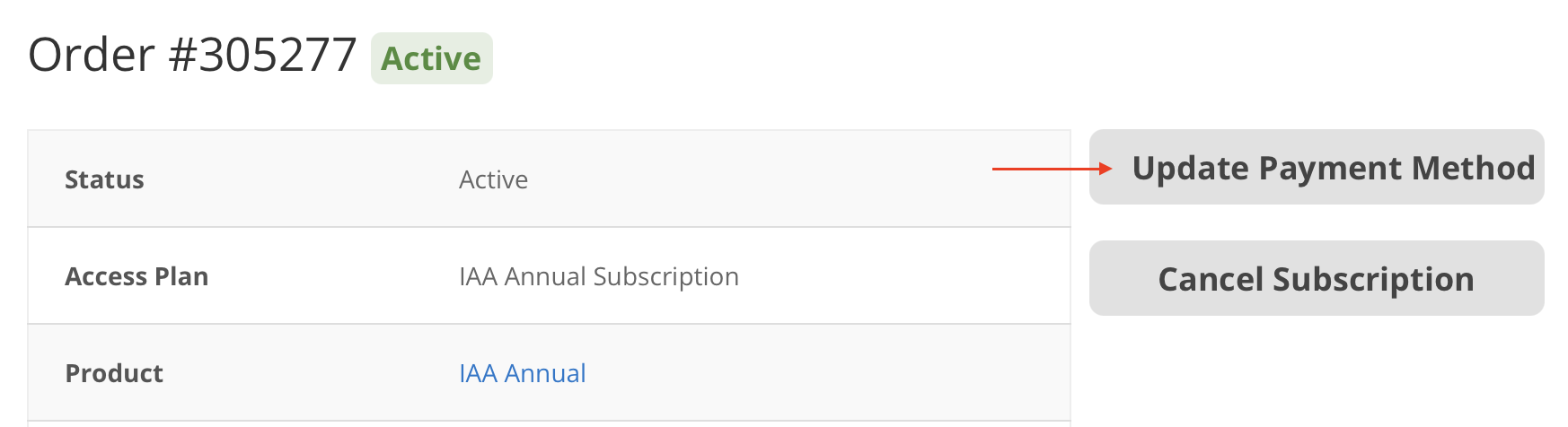
How can I change my payment details?
How can I change the email address associated with my account?
To change your email address that’s associated with your IAA account:
hover over ‘MEMBERS‘ (top right corner), click on Account Details, then type the new email address in the email address field, click Save Changes.
How do I enroll on the Weekly Programs?
General questions
Blank and hidden
How to navigate the IAA after the re-launch in February 2026
In February 2026 we made some updates to the IAA which includes a bit of shuffeling around of some videos and the layout of the website.
If there is any confusion or if you have any questions about the updates, please visit the IAA Discord server and see the discussions there.
If your question is not answered in the previous discussions, please ask your question in the tech-support channel.
Instructions on how to connect to discord can be found below
All about connecting to Discord
Recently we have decided to move away from Facebook to Discord. All paid members have access to the Discord community.
First, you’ll need to create your own Discord account – you can do that either at https://www.discord.com or by installing the app on your computer or phone.
Then, on your IAA Student Dashboard, on the right you will see a button to connect to Discord. Click it and follow the instructions.
Your Discord membership is tied to your IAA paid membership. If you cancel your subscription, you’ll lose access to the Discord community.
TROUBLESHOOTING
After you join the server, or renew your membership, it could happen that in Discord you will not see all the channels reappear. To reset the connection, try these steps:
1. In Discord, click on the “burger” (3 horisontal bars) icon to see the list of your servers. Click on the IAA logo. You should see many channels. If you only see #incoming channel…
2. On your IAA Student Dashboard, click the Disconnect button
3. Click the Connect button again. Wait for a couple of hours for the automated process to update your Discord membership.
If the above doesn’t work, try playing about with different combinations of disconnecting from the Discord, manually leaving the server, reinstalling your Discord app etc.
Above are the only steps to try to fix the problem, admins won’t be able to help you in any other way!
Are Zoom Events recorded?
Yes, all zoom events are recorded, and the vast majority of events are later listed on studyneigong.com, where you can find details and purchase them.
Are there free Zoom classes for the members of The Academy? Where can I view the recordings?
Ocasionally Damo Mitchell will run free Zoom sessions for the Academy members, both to help the novice practitioners with the foundations of their practice, and to help with refining of the further skills. The sessions take place every now and again, and run for approximately 2 hours.
Zoom courses are advertised on the lotusneigong.com website under Damo Zoom Events
Links to free Zoom events are shared on the IAA Discord.
In most cases the recordings will be added on SNG as seperate courses to be purchased, or they will be added to The Library, however in some cases the recording may not be suitable for everyone, therefore will not be shared.
Visit ‘Zoom Informal Sessions’ in the Library for recordings of past sessions.
Does Damo Mitchell run online workshops? How do I access the recordings?
Occasionally Damo Mitchell will run workshops – these are available to academy members and must be registered and paid for individually. The attendance numbers for these workshops are normally limited to 300 places, and the admission will be checked based on the names. Please make sure your Zoom display name is the same as the name used for workshop registration, otherwise you may not be admitted. The recordings of these workshops will be later accessible on studyneigong.com
Where can I find details about upcoming courses?
All public courses are advertised on https://lotusneigong.com/ under the Events tab
Are there any Lotus Nei Gong affiliate instructors in my area?
All LNG qualified active instructors are listed on our Brances page on lotusneigong.com
Does the membership include all 3 programs - Nei Gong, Taijiquan and Xing Yi?
Yes, both the monthly and annual subscriptions include all 3 programs, plus (full or partial) access to the Library content. Members are automatically enrolled on the Nei Gong program, but need to volantarily enroll on the other programs. To do this, click on ‘course enrolment’ on your dashboard.
What is meant by "Lifetime Access"?
If we have not managed to answer your question here, you can get in touch with us via Contact Us page.
Best regards, The Internal Arts Academy!